On this page
- First Atlantic Commerce is now Powertranz
- How the HighLevel connection works
- Choose Direct or HPP from the credentials you received
- Information you need before setup
- Connect Powertranz to Genius Checkout
- Connect Genius Checkout to HighLevel
- Test one-time and recurring payments separately
- Common causes of a failed start
- Use the same Powertranz connection beyond HighLevel
- Questions merchants ask
- Sources
Genius Checkout connects a supported Powertranz merchant account to HighLevel as a custom payment provider. Merchants can take payments from HighLevel sales flows while Powertranz processes the transaction under the merchant's bank or acquiring agreement. First Atlantic Commerce and FAC refer to the gateway's former name.
This guide reflects the Genius Checkout implementation reviewed on September 4, 2026. Your bank controls the currencies and gateway capabilities enabled for your merchant account.
| Connection detail | Current Genius Checkout support |
|---|---|
| Platform names | HighLevel, GoHighLevel, GHL, LeadConnector |
| Gateway names | Powertranz, First Atlantic Commerce, FAC |
| Gateway modes | Powertranz Direct and Powertranz hosted payment page |
| One-time payments | Supported |
| Saved cards and recurring charges | Supported when Powertranz tokenization and the merchant plan allow them |
| Settlement | Handled through the merchant's Powertranz and acquiring-bank agreement |
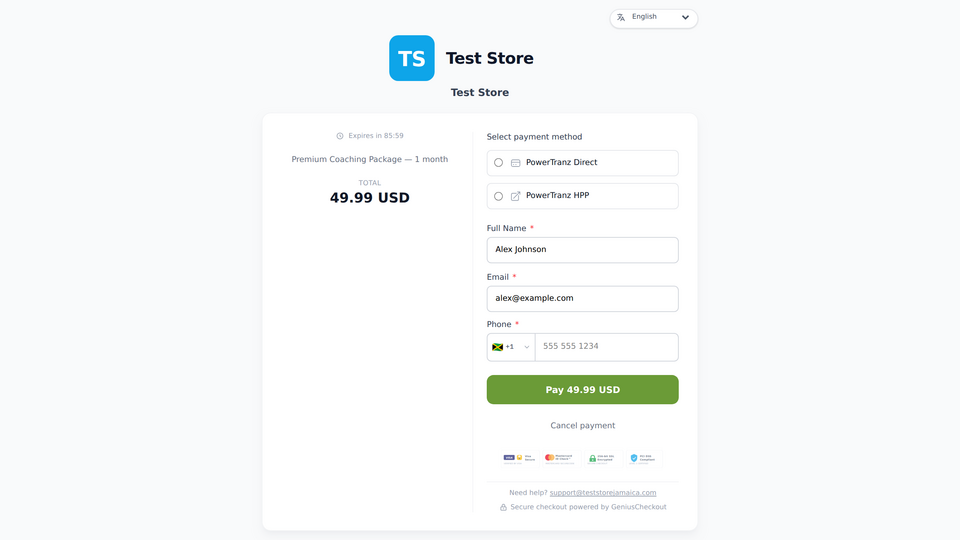 A Genius Checkout payment screen used during a HighLevel payment flow. The available methods come from the merchant configuration.
First Atlantic Commerce is now Powertranz
Powertranz announced the official First Atlantic Commerce rebrand on May 7, 2025. Older onboarding packs, bank messages, and technical documents may still use First Atlantic Commerce or FAC.
Do not assume that every legacy field maps to a new configuration field. Match the merchant ID, password, hosted-page values, endpoint, environment, and enabled features to the material supplied for your account. Ask your bank or Powertranz to confirm any ambiguous credential.
How the HighLevel connection works
HighLevel sends the order and supported buyer details to the Genius Checkout custom payment provider. Genius Checkout creates a unique checkout session for that payment attempt and presents the methods enabled for the merchant.
The buyer completes the Powertranz flow. Genius Checkout then records the gateway result and returns the status to HighLevel. A retry creates a new payment attempt and transaction record; it does not rewrite a failed transaction.
Provider-hosted pages may block iframe display. Genius Checkout can move the buyer into a top-level secure checkout when the payment flow requires it, then return the result to the originating HighLevel page.
Choose Direct or HPP from the credentials you received
Powertranz Direct and the hosted payment page use different credential sets and buyer journeys.
| Question | Direct | Hosted payment page |
|---|---|---|
| Who presents the card-entry experience? | Genius Checkout coordinates the direct gateway flow | Powertranz presents the provider-hosted page |
| Which credentials do you enter? | The Direct credentials issued for the merchant | The hosted-page settings issued for the merchant |
| Can one set of credentials replace the other? | No | No |
| Who determines PCI scope? | The complete implementation and the merchant's compliance adviser | The complete implementation and the merchant's compliance adviser |
Use the mode your provider enabled. Do not choose HPP because its name sounds easier or Direct because it sounds faster. The account configuration decides which request Powertranz will accept.
Information you need before setup
- A HighLevel location with permission to install and configure the payment provider.
- A Genius Checkout merchant account.
- Powertranz test or live credentials for one specific mode.
- A currency enabled on the merchant account.
- Confirmation that tokenization is enabled if you plan to sell subscriptions.
- A test product or payment link that does not contain customer data.
Keep processing passwords and API secrets inside the secure configuration. Do not send them in screenshots, chat transcripts, or support tickets.
Connect Powertranz to Genius Checkout
- Sign in to Genius Checkout and open Gateways.
- Select Powertranz Direct or the Powertranz hosted-page option that matches your onboarding details.
- Select test or live mode.
- Enter the required credentials for that same environment.
- Select only currencies enabled by the bank or acquirer.
- Save the configuration and confirm that Genius Checkout reports success.
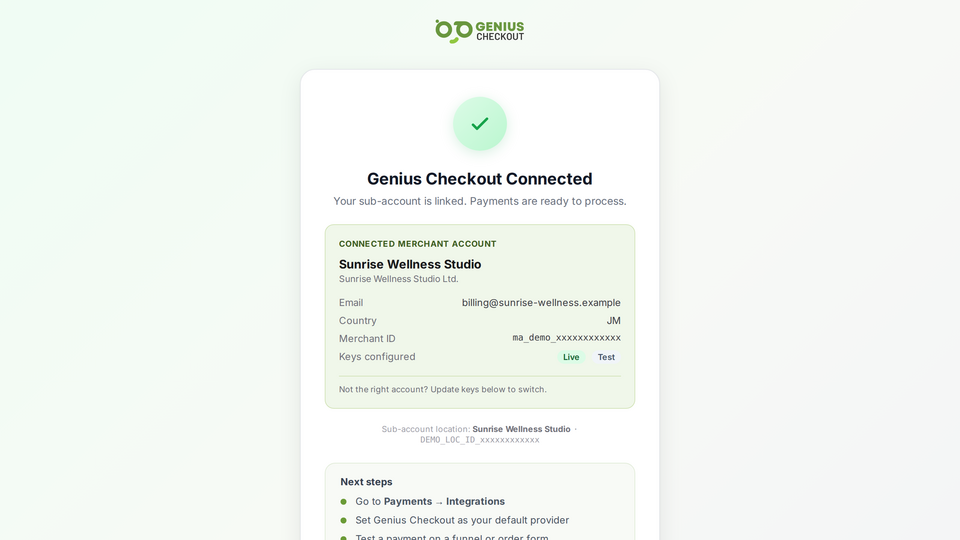 The gateway configuration separates credentials, behavior, and enabled currencies. Field names change with the selected gateway mode.
If the form reports a missing test or live currency, select at least one currency for the environment you are configuring. A browser request that returns validation errors without a visible message requires support attention before launch.
Connect Genius Checkout to HighLevel
- Open the HighLevel location that will receive payments.
- Install or open Genius Checkout in the HighLevel App Marketplace.
- Authorize the correct Genius Checkout merchant.
- Confirm that the connection screen shows the intended merchant name.
- Add Genius Checkout to a test product or supported payment surface.
- Complete the test checklist before using live mode.
The merchant displayed in HighLevel must match the merchant whose Powertranz credentials you configured. Agency users should verify this for each client location.
Test one-time and recurring payments separately
A successful one-time payment does not prove that subscriptions will work. Recurring charges require a reusable provider token, an eligible Genius Checkout plan, and a Powertranz account enabled for tokenization.
Test these paths:
- Successful one-time payment.
- Declined one-time payment with a readable buyer message.
- Buyer cancellation and return to HighLevel.
- Saved-card checkout if enabled.
- Initial subscription payment or trial setup.
- Merchant-initiated renewal using the saved method.
- Refund, void, or capture from the system where your team will perform it.
Record the HighLevel order ID, Genius Checkout transaction ID, receipt number, gateway reference, UTC test time, gateway mode, and result. Never record a full card number or security code.
Common causes of a failed start
No gateway configured. The connected Genius Checkout merchant has no active gateway for the selected environment and currency.
Wrong environment. Test credentials cannot start a live payment, and live credentials should not appear in test configuration.
Currency not enabled. The HighLevel product currency must match a currency enabled in both Genius Checkout and the Powertranz merchant account.
Merchant mismatch. The HighLevel location may be connected to a different Genius Checkout merchant than the one you configured.
Recurring capability missing. A plan restriction or gateway tokenization setting can reject a subscription even when one-time payments work.
Genius Checkout should display the specific API error when it can do so safely. Keep the correlation or request ID when contacting support.
Use the same Powertranz connection beyond HighLevel
The merchant configures Powertranz once in Genius Checkout. The approved account can then support these connections after the merchant tests each one:
- WooCommerce stores.
- Ecwid storefronts.
- GiveWP donation forms.
- Hosted payment links and QR-code payments.
- Supported custom applications through the Genius Checkout API documentation.
Each platform creates its own source order, and each retry creates a new payment attempt. Genius Checkout keeps the gateway credentials in one merchant configuration.
Questions merchants ask
Does NCB eCommerce work with this HighLevel integration?
NCB's published ecommerce material identifies Powertranz, formerly FAC, for its hosted card-payment service. Use the exact gateway mode and credentials in the merchant onboarding pack. The NCB eCommerce solution page explains the relationship.
Does Genius Checkout hold the payment funds?
No. Powertranz and the merchant's acquiring arrangement handle payment processing and settlement. Genius Checkout manages the software connection and transaction workflow.
Where can I compare the gateway modes?
Read the Powertranz gateway overview and the field-level Powertranz configuration guide.
Can I use the same connection for more than one HighLevel client?
Each merchant and location should connect to the Genius Checkout account assigned to that business. Agencies can manage clients without mixing merchant credentials or transaction records.
Sources
- Powertranz: First Atlantic Commerce is now Powertranz
- Powertranz company overview
- HighLevel custom payments documentation
- Genius Checkout in the HighLevel App Marketplace
- Genius Checkout Powertranz overview
- Genius Checkout HighLevel overview
Need help matching a bank onboarding pack to the correct mode? Book a connection review without sending passwords or secret keys.